When you add a photo to Nemi Gallery, the expensive part happens before anything is uploaded. Your own browser decodes the photo, scales it to the size the workspace's plan keeps, and encodes it as AVIF. Only that finished file travels to us, and the original stays where it was, on your phone or your laptop, whenever your browser can do the encoding.
That is an unusual way to build a photo library, and it has a consequence we want to be plain about from the first paragraph: Nemi does not keep your original files. It keeps a smaller, very good copy. Here is why we built it that way, what it costs, and what the copy actually looks like next to the original.
Why encode on my device and not on your server?
Because of what a photo library is: tens of thousands of pictures arriving at once. Encoding AVIF is slow work. The timings we recorded when we chose our server encoder's settings run from about 0.13 seconds for a small photo to 1.6 seconds for a large one. Multiply that by a hundred thousand photos and a single import is hours to days of a processor doing nothing else, while every other person using Nemi waits behind it.
Your device, meanwhile, has several cores sitting idle while it waits for the network. Doing the work there spreads it across as many machines as there are people importing, runs it in the background without freezing the page, and means only the compressed bytes cross your connection. On the six photographs we measured, the copies Nemi keeps on the Pro plan add up to 27% of the original files: 6.1 MB instead of 23 MB. The upload finishes sooner than a server could have finished queueing.
What happens when you add a photo
1/5The metadata is read from the original
If my device does the work, what stops it lying?
Nothing the device says about the file itself is believed. A browser can be modified, and a free account could otherwise upload full resolution photos and simply claim they were 1024 pixels. So once the file is in storage, Nemi reads the first part of it, the part every AVIF file must start with, and takes the format and the dimensions from there. A file that is not AVIF, or is larger than the plan allows, is refused. The size that counts against your storage comes from storage itself, never from the upload form. The device does the work; the server decides what it means.
What if my browser cannot encode AVIF?
Then the server does it, as a fallback and deliberately as the slow lane. Two cases send a photo there. Some browsers cannot encode AVIF at all; Chromium based browsers such as Chrome and Edge can, and others hand the job over. And most browsers cannot even open an iPhone HEIC photo, which is most iPhone libraries opened on a desktop. Nemi notices either case on its own and sends the original instead. That original arrives with everything in it, its location included; the location is removed on the server, and the original is discarded.
On the server it waits for one of two encoding slots, is converted with the same quality and the same size limit, and the uploaded original is discarded immediately afterwards. It is never kept. That is the same promise our privacy policy makes in section 3.8, and the iPhone app follows it too: it converts on the phone where it can, and sends the original only when it cannot.
How much smaller is the photo Nemi keeps?
A lot, and how much depends on the plan, because every plan keeps photos up to its own size. The plan that counts is the one of whoever owns the workspace. Pick one: each bar is one of six photographs, the grey is the file that was added, and the colour is what Gallery keeps of it.
The photo you added, and what Gallery keeps
62x
smaller than the photo you added, median of six photos, on Free, which keeps 1,024 pixels on the longest edge.
Forest and lake from above
9.1 MB to 207 KB
Evening clouds
5.3 MB to 16 KB
Desert butte
2.6 MB to 79 KB
Lighthouse at dusk
4.4 MB to 21 KB
Temple columns
1.2 MB to 50 KB
Horizon after sunset
365 KB to 4.5 KB
- The photo you addedWhat Gallery keeps
How much of that is AVIF itself?
To take the size limit out of it, we compared formats at the same pixel size, and measured it rather than quote somebody else's chart. Six photographs (landscapes, architecture, sky) were scaled to each plan's limit and written three ways at the same pixel size: lossless PNG, JPEG at quality 90, and AVIF at Nemi's settings. Across every photo and every size, the AVIF was between 1.5 and 18.8 times smaller than the JPEG, and the median was 3.9 times.
Median file size per photo, by plan
Free
longest edge 1,024 px
Starter
longest edge 2,048 px
Creator
longest edge 3,072 px
Pro
longest edge 4,096 px
Max and Business
capture resolution
How we measuredHide the method
Measured on 2026-10-03 on an Apple M2, 8 cores, with sharp 0.34.5, libvips 8.17.3, libaom 3.13.1. Each photo was rotated upright and resized to fit the plan's longest edge (never enlarged), then encoded once per format from the same uncompressed pixels. AVIF used quality 58 at effort 1, exactly the settings of Nemi's server fallback. Your browser's encoder uses the same quality but its own speed setting, so its files can come out slightly different.
The photographs are Unsplash originals. Sizes are deterministic, so one run each. The harness is scripts/blog-bench/gallery-avif/bench.ts.
3.9x
smaller than JPEG at quality 90, median of all sizes
501 KB
median photo at the Pro plan's 4096 pixels
6.9 KB
median grid thumbnail, the file you scroll past
What do I lose?
Detail you would mostly have to go looking for. Drag the divider: the left side is the photo at the plan's size with no compression at all, the right side is what the stored AVIF decodes to, pixel for pixel.
The same pixels, before and after
Pro plan, a crop from the photo stored at 4096 by 3067
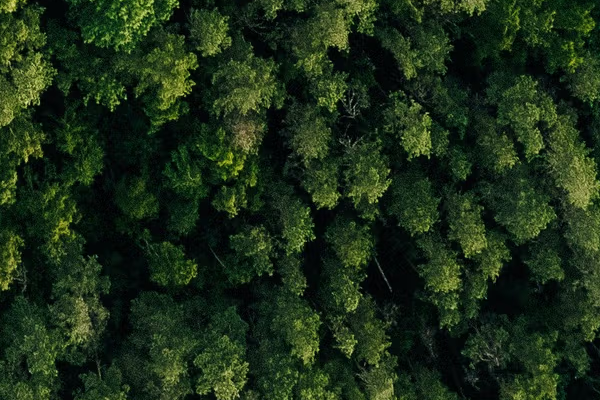 UncompressedWhat Nemi stores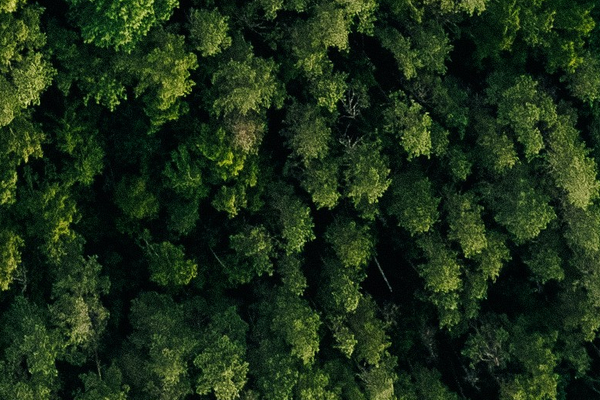
- As PNG, lossless
- 31 MB
- As JPEG, quality 90
- 5.8 MB
- As Nemi stores it
- 3.6 MB
Whole photo at this size. Photograph by Kristaps Ungurs on Unsplash.
Look at the clouds and you can see what AVIF gives up first: grain. The fine noise of the camera's sensor is smoothed into flatter colour, because noise is the most expensive thing in a photo to store and the least meaningful. Edges, texture and colour hold up.
We also measured it, with SSIM, a standard score for how closely one picture matches another (1 means identical). Nemi's AVIFs scored between 0.924 and 0.996. The JPEGs at quality 90 scored between 0.901 and 0.999, and were closer to the original than the AVIF in 20 of the 30 cases. That is the honest shape of the trade: the AVIF is several times smaller, and slightly less faithful. For looking at photos on any screen it is a trade we would make every time. For a print or a heavy edit it is not, which is why the next part matters.
Why Nemi does not keep the original
Keeping only the encoded copy is what makes a library of tens of thousands of photos affordable to keep forever, on every plan, including Free, where photos never expire. The price is that the decision is made once, at upload, and cannot be undone.
Gallery keeps a very good copy of every photo, never the original. That is the product, not a shortcut.
- Upgrading later does not bring detail back. A photo added on Free is stored at 1024 pixels and stays that way. A new plan applies to photos added after it.
- Downgrading never shrinks what you have. Photos already in the library are left exactly as they are.
- It is not a master archive. If you shoot RAW, print large or edit heavily, keep the originals somewhere built for originals, and never only in one place.
| Plan | Longest edge stored | Photos |
|---|---|---|
| Free | 1,024 px | 2,000 |
| Starter | 2,048 px | 25,000 |
| Creator | 3,072 px | 75,000 |
| Pro | 4,096 px | 250,000 |
| Max | Capture resolution, up to 16,384 px | 500,000 |
| Business | Capture resolution, up to 16,384 px | 1,000,000 |
Even on Max and Business, which keep the resolution your camera captured, the photo is still re-encoded as AVIF. Full resolution there means every pixel, not the original file.
What happens to the date, the camera and the location?
Re-encoding throws away everything a camera writes into a file, so Nemi reads it first, from the original, on your device, and stores it alongside the photo: when it was taken, the camera and lens, shutter speed, aperture, ISO, focal length and, if the camera recorded one, the location. Without that step a decade of holidays would sort itself into the afternoon you uploaded it.
The details of every limit are on the photo limits help page, and Gallery has the rest of what the library does. If you need to change a file's format yourself rather than store it, that is what the converter is for, and our converter benchmarks show what AVIF and WebP cost to make there.
Questions people ask
Is AVIF better than JPEG?
For keeping photos small, yes. In our measurements at the same pixel size, AVIF files were a median 3.9 times smaller than JPEG at quality 90. The JPEG matched the original slightly more closely in 20 of our 30 comparisons, and more older software opens JPEG, so AVIF suits viewing on screens better than print or heavy editing.
Does Nemi keep my original photos?
No. Nemi Gallery keeps a re-encoded AVIF copy at the size the workspace owner's plan allows, never the original file. When your browser can encode AVIF, the original never leaves your device; when it cannot, the original is uploaded, converted on our server and discarded straight away. Keep your originals somewhere built for them.
How much smaller are photos in Nemi Gallery?
It depends on the plan of whoever owns the workspace, because each plan keeps photos up to its own size. On Free, which keeps 1024 pixels on the longest edge, the median photo in our test was 62 times smaller than the file that was added. Plans that keep more pixels save less, and the AVIF format on its own accounts for about 3.9 times.
Can I upload iPhone HEIC photos to Nemi Gallery?
Yes. Most desktop browsers cannot open HEIC, so Nemi notices and sends the original to our server instead, which converts it to AVIF with the same quality and size limit and then discards the original. The iPhone app converts on the phone where it can.
Does converting a photo to AVIF remove its date and location?
Re-encoding drops what a camera writes into the file, so Nemi reads it first and stores the capture time, camera, lens, exposure and location alongside the photo. If you set Location is removed on upload, the coordinates are dropped before the photo is stored, and on your device whenever your browser does the encoding.
What resolution does Nemi Gallery keep?
Free keeps the longest edge at 1024 pixels, Starter at 2048, Creator at 3072 and Pro at 4096. Max and Business keep the resolution the camera captured, up to 16,384 pixels, still re-encoded as AVIF. The plan that counts is the workspace owner's, and upgrading later does not sharpen photos already added.
Where the numbers come from
- The device encoder:
lib/gallery/encode.ts (encodePhoto, planEncode) - The server fallback and its measured effort setting:
lib/gallery/transcode.ts - The header check on what was uploaded:
lib/gallery/avif.ts (probeAvif) - Metadata read before the re-encode:
lib/gallery/exif.ts - Quality, thumbnail size and resolution caps:
lib/gallery/plan.ts, lib/pricing-plans.ts (galleryMaxEdgePx, galleryMaxPhotos) - The benchmark harness and its results:
scripts/blog-bench/gallery-avif/bench.ts, lib/blog/data/gallery-avif-on-device.json - What happens to originals: /privacy (section 3.8)